LabVIEW NXG 4.0 was released as a lead-up to NIDays Europe 2019 and was among the topics of conversation at last year’s event in November. Here is a summary of the most important new features.
New interfaces
One of the major announcements at NIDays 2019 was the announcement of the collaboration between National Instruments (NI) and MathWorks, which has resulted in easier integration between the two companies’ products—among the top tools in the engineering industry. For NI’s VeriStand, it has become easier to import models from Simulink, and for LabVIEW NXG (LV NXG), a MATLAB interface has been added. This means you can import a .m file from MATLAB directly into LV NXG and run it as a subVI.
For TestStand users, an LV NXG adapter has also been added, allowing you to execute code modules written in LV NXG. In LV NXG, a TestStand palette has also been added, providing access to a range of calls in TestStand. This also makes it possible to create operator user interfaces for TestStand.
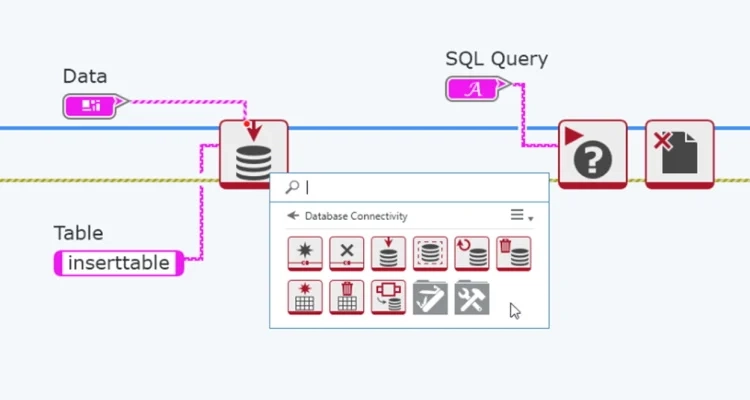
Version 4.0 now also includes a built-in interface to databases, although it does not yet support all database types. You can now access a wide range of databases—including SQL databases—directly from LV NXG and insert data from LV NXG’s built-in data types.
Other features
Another important addition to LV NXG is NI’s Actor Framework (AF). AF is one of the most widely used templates for advanced designs in LabVIEW, and with version 4.0 it is now also available in NXG. In short, AF is a structure around which applications with multiple independent processes can be built. The advantage is a predefined system for communication between processes, helping to avoid race conditions. In addition, it is also a well-defined way to start and stop processes.
Finally, it is worth mentioning that the FPGA module in LV NXG has once again been expanded with more intuitive user interfaces and increased hardware support. For example, it is now possible to get a visual overview of operations that span multiple clock cycles, and support for FlexRIO and USRP has also been added.
Need assistance?
If you need assistance with a LabVIEW-related project, contact GPower—the leading LabVIEW experts in Denmark! We have experience developing user interfaces in LV NXG that, with a modern visual design, provide a better user experience for your LabVIEW applications.
![Don’t let your error codes become the next Blue Screen of Death [3:4]](https://gpower.io/wp-content/uploads/2026/09/Figur-1-Windows-11-Blue-Screen-of-Death-1-300x225.webp)


![Error handling in LabVIEW [2:4]](https://gpower.io/wp-content/uploads/2026/06/Fejlhaantering-i-labview-jesper-kjaer-soerensen-gpower-300x169.png)

![Don’t let your error codes become the next Blue Screen of Death [3:4]](https://gpower.io/wp-content/uploads/2026/09/Figur-1-Windows-11-Blue-Screen-of-Death-1.webp)