This post [4:4] is part of a series by GPower’s systems engineer, Jesper Kjær Sørensen, on building robust software and test systems.
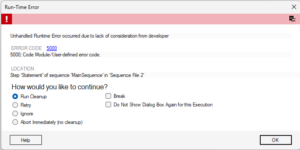
When an error occurs in a test system, the operator should rarely be the one deciding what happens next. If the operator is frequently presented with a dialog box offering options such as Retry, Ignore, or Abort, you have effectively shifted part of the error handling responsibility from the system to the operator.
Over time, the operator learns which errors can be ignored, when to restart the test, and when to call someone from the development team. This may seem to work well, but in reality, it means that error handling has been left to Technician Mads on the production floor.
In this article, we explore how TestStand can be used to prevent and handle errors, ensuring that the test system – rather than the operator – takes responsibility for managing them.
Not all errors are the same…
1) Safety errors
When a safety error occurs, the only appropriate action is to bring the test system into a safe state. Ideally, this should be handled by the safety system that monitors your test system. Safety errors involve situations where there is a risk of personal injury and should be handled independently of the test system’s execution.
2) System errors
This article primarily focuses on system errors that occur during operation, which are detected and represented in TestStand as “Runtime Errors”. These system errors, or operational errors, are not the same as product failures and should not be treated as such. A system error affects the test system’s ability to perform a test and must not result in a product being incorrectly classified as failed. For example, if a power supply in the test system fails to deliver the correct voltage to the product, this is an operational issue or system error, which often manifests as a series of products failing on the same tester.
3) Product failures
Product failures, on the other hand, occur when a product does not meet its specified requirements. For example, if a product is required to deliver a voltage between 11 and 12 VDC but only delivers 10.5 VDC, it falls outside the specified voltage range and is therefore classified as a failed product.
Sources of unhandled system errors
System errors can arise from both errors introduced during the development of the test system and issues with the resources that a test depends on. An example of a system error introduced during development is when a developer copies steps from one test sequence to another but forgets to create the variables used in the new sequence. These types of simple errors can be detected using TestStand’s Sequence Analyzer (Read more about the Sequence Analyzer tool here). This tool performs static sequence analysis but cannot check dynamically generated expressions.
Another potential source of errors is when a developer works on a test sequence without being able to test changes iteratively because the test system is not operational. Additionally, developers may make assumptions about specific states of the Device Under Test (DUT), such as establishing and maintaining network connections or missing conditioning.
Code modules are a known source of unhandled system errors, or more precisely, the interface between the code modules and the test sequence. This is not specific to LabVIEW code modules, but let’s use them as a basic example. In LabVIEW code, it is common for a VI to have an error cluster output to report errors. Through TestStand’s LabVIEW Adapter, errors reported via the error cluster are propagated to the step result and subsequently to TestStand’s error handling mechanisms, including the configurable callbacks, as illustrated in Figure 1.
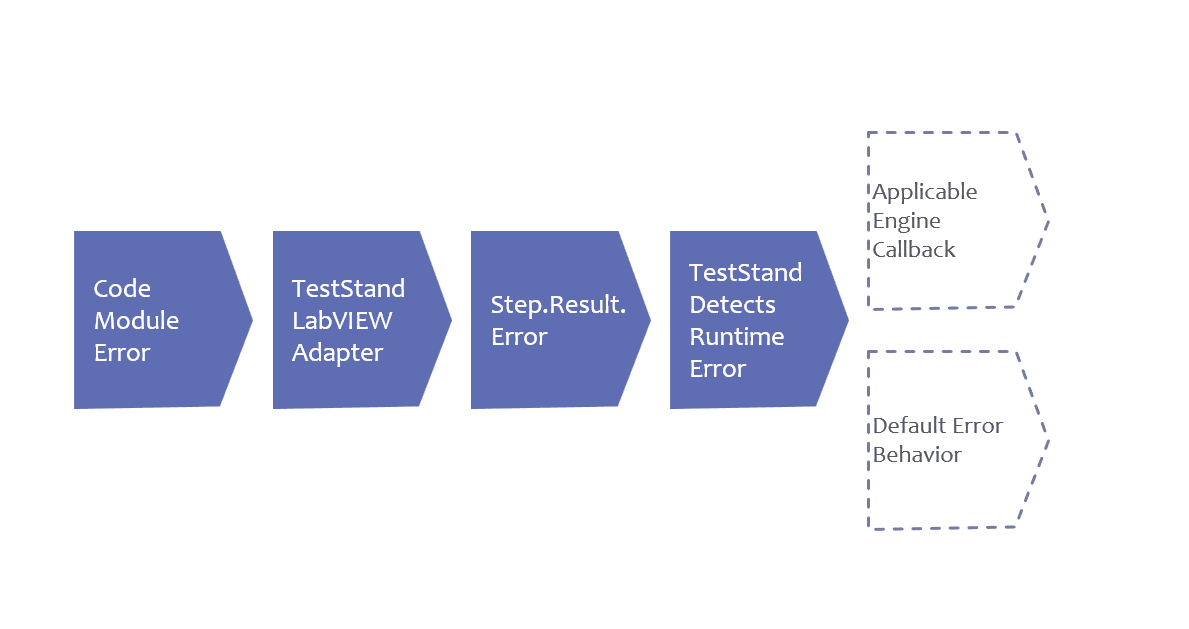
As a developer, you should therefore be particularly careful about how you implement system error handling within the code module and which system errors you propagate to the calling sequence. In this context, it is also important to understand how errors propagate through TestStand during test execution, as illustrated in Figure 2 below.
Why should you translate your error codes?
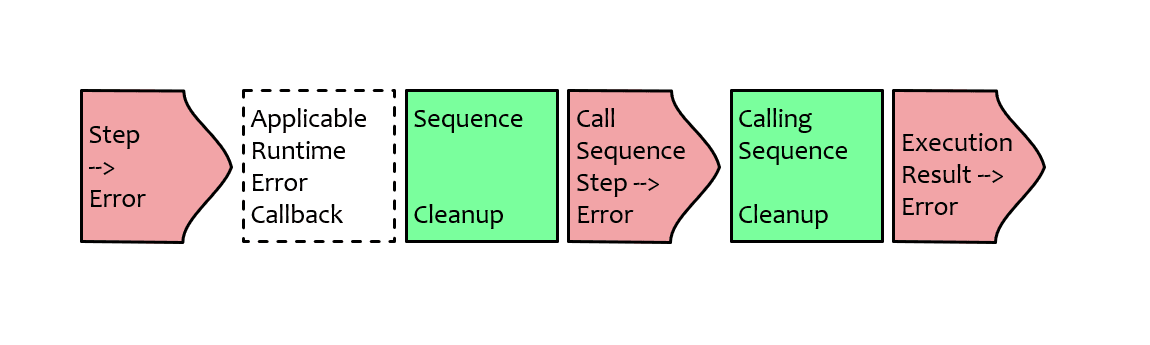
When an error occurs in a step within a subsequence, TestStand executes the available and appropriate callbacks configured by the developer. The cleanup step group for that subsequence is then executed. If the error remains active after the respective runtime error callbacks, the sequence call in the calling sequence reports an error and transitions to its own cleanup step group. This process continues until TestStand reaches the top level, where it can report that an error occurred during test execution.
Error handling at the lowest possible program level
Responsibility for error handling should be placed at the lowest possible program level where the necessary knowledge to handle the specific error is available. In software development, the principle of “Single Responsibility” states that each component should only be responsible for its own area of functionality. This principle also applies to test system development. A code module should only handle the responsibilities it was designed for, such as attempting to re-establish a connection to a power supply. The code module should therefore not determine whether the Device Under Test (DUT) should be marked as failed if the connection fails, as this responsibility belongs to the calling step in TestStand.
Most test systems based on TestStand use the built-in process models, which are designed to provide logical locations for error handling. All process models include built-in subsequences or callbacks that can be overridden for individual test sequences or specific test stations. In other words, the process models already account for where your error handling code should be placed and when it should be executed. This works even better across process models. You can find a list of the built-in callbacks here.
As you may have noticed, there are at least three different places where you can override TestStand’s default behavior when handling errors:
- SequenceFilePostStepRuntimeError
- ProcessModelPostStepRuntimeError
- StationPostStepRuntimeError
The callbacks are invoked in different contexts, and it is very important to understand how they relate to one another.
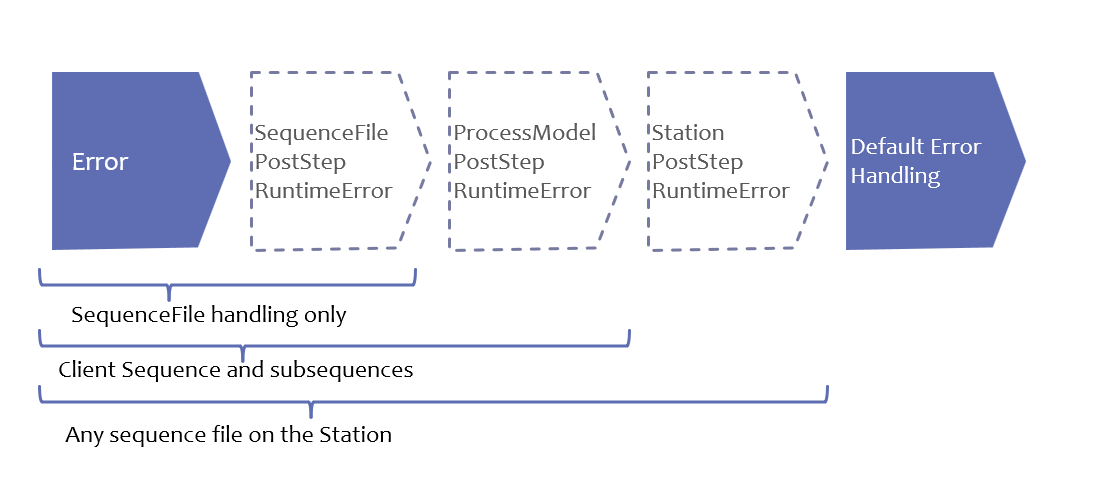
If you override a PostStepRuntimeError callback at the sequence level, it will only execute for the step that encounters an error in the specific sequence file where the callback is defined. PostStepRuntimeError does not handle errors that occur in an external sequence located in another file and called through a sequence call. However, if you override both this callback and ProcessModelPostStepRuntimeError, error handling will also include the external sequence. The relationship between these callbacks is illustrated in Figure 2, showing how the different callbacks interact with one another. Overriding a single callback is relatively straightforward, but it is important to note that TestStand executes the respective callbacks when multiple callbacks are overridden.
The system errors handled within the test sequence may be resolved by repeating the action that caused the error. If the test assumes that the Device Under Test (DUT) is in a specific state, it can attempt to restore the DUT to the required state. However, other issues unknown to the test system may be causing the error, in which case repeating the action will not resolve the problem, such as when a configuration file is corrupted. If these recovery attempts fail, the test system can safely terminate the test and shut down by executing the appropriate cleanup steps, where the developer has defined the necessary operations to bring the system into a known state.
Improve your error handling over time
In the late 1940s and early 1950s, the Toyota Production System emerged, and many of the challenges it addressed are still relevant today. Under this system, all employees had the opportunity to stop production when they identified an error that could be eliminated. It is important that both operators and, especially, their managers recognize that eliminating each of the error dialogs mentioned above is beneficial to the company. This should not be overlooked in today’s busy production environments, where everyone is working to meet KPIs and performance targets.
Test developers should therefore be proactive in improving error handling to prevent errors from occurring. If errors cannot be avoided, measures should be implemented to eliminate the need for the operator’s knowledge and experience. Network communication failures occur for a reason. For example, the code module could be designed to automatically re-establish the connection instead of propagating an error to the rest of the system. If the reconnection attempt fails, it is appropriate to report a communication error with the Device Under Test (DUT) and safely terminate the test. This process is handled entirely within the test sequence after it has attempted to resolve the error.
If the retry attempt is logged in TestStand, the test report can show that an attempt to re-establish the connection to the DUT failed, resulting in the DUT subsequently being marked as failed. That said, there can be many reasons why the network connection is no longer working, such as:
- Damage to the network cable or connector
- Wear on the electrical contacts on the fixture
- IT has rolled out a new configuration to the switch/router that the network cable runs through
- Power outage on the switch or router
- And many other issues…
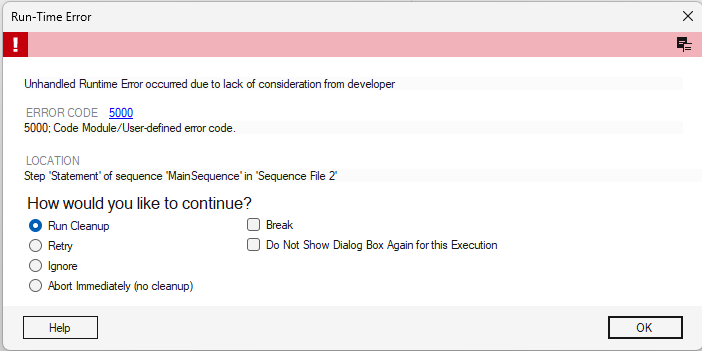
This is not the same as presenting the operator with a dialog box, as shown in Figure 4, asking them to decide what to do next. The error-handling strategy has already been defined, including an additional attempt to establish a connection to the DUT, thereby removing the responsibility from the operator. If the operator is unfamiliar with TestStand, it may be difficult for them to understand the consequences of the different options available in the dialog box shown in Figure 4. For example, the operator may not know what “Cleanup” means or why it is important in the context of TestStand.
Furthermore, these dialog boxes and the resulting lack of proper error handling are among the factors that prevent a test system from achieving high throughput. From a production manager’s perspective, it is easy to imagine an operator having to consult a colleague to make the right decision when faced with such a dialog box. This results in unnecessary downtime that could have been avoided. The time invested in improving a test system’s error handling and shutdown procedures can quickly pay off once these issues are resolved. Most importantly, there must be open communication between operators and developers. Just as the product evolves over time, the test system and its error handling capabilities should evolve accordingly.

Effective error handling means letting the test system take responsibility for handling errors – not the operator. This results in fewer interruptions and more efficient production.
– LabVIEW Champion, Jesper Kjær Sørensen, GPower