![Don’t let your error codes become the next Blue Screen of Death [3:4]](https://gpower.io/wp-content/uploads/2026/09/Figur-1-Windows-11-Blue-Screen-of-Death-1.webp)
This post [3:4] is part of a series by GPower systems engineer Jesper Kjær Sørensen on building robust software and testing systems.
Does this sound familiar...?
You have three hours left until your deadline, and then the one thing that must not happen happens. Your computer throws up a “Blue Screen of Death” and spontaneously restarts. After the restart, you discover that everything has been saved, and you’ve had a lucky escape. You can still make your deadline, and all is well. But you’re left with two questions: Why did the error occur, and how can I prevent it from happening again? In other words, you’ve just encountered Windows’ way of translating the computer’s internal errors: the dreaded Blue Screen of Death!
I’m well aware that Microsoft has painted it black in Windows 11, but that’s not important for this article.
![Don’t let your error codes become the next Blue Screen of Death [3:4]](https://commons.wikimedia.org/wiki/File:Windows_11_BSOD,_build_22000.51.png)
In this third article in the series on error handling, we dive into the process of translating internal errors into external errors across an API boundary. The aforementioned—and dreaded—Blue Screen of Death is a prime example of how NOT to do it. Just to clarify: By translation, I don’t mean linguistic translation from one language to another. I mean translating an internal error into a different, more specific error code. We’ll also look at some systematic approaches that you can use to your advantage in your own code. The article is based on the graphical programming language LabVIEW, but the principles and practices involved in translating internal errors are equally relevant to other programming languages, such as Java, C#, and even Python. It’s simply good programming practice.
Why should you translate your error codes?
Translating error codes serves several purposes. It should be seen more as an active process of filtering what is relevant to report further.
If you don’t translate your errors into API-specific errors, it becomes more difficult to determine where a generic error code originates. After all, it could just as easily come from the code calling the API as from your product API itself.
Returning a specific error code that matches the API action the user attempted provides more meaningful information. For example, if your API communicates with a web service to create a user, it makes little sense to report the status code returned by the web service when an error occurs. The action your user is trying to perform is to create a user, so the error should be translated into a specific error related to user creation. That error can then include parameters that make troubleshooting easier for the user, such as characters that are not allowed or similar information.
Translating error codes improves the consistency of your API by ensuring that the functions provided by your API return logical and meaningful responses. This is important when your API executes successfully, but it is just as important when your API fails. After all, you don’t want your API to become the new “Blue Screen of Death” in your product category.
The benefits of error code translation
Error codes are part of your API’s interface, and they help determine the backward compatibility of your API. This is yet another reason to translate your error codes into more specific codes. What happens, for example, if the previously mentioned web service changes the status code it returns when a user cannot be created? If you translate the web service’s error code, you can still translate the new status code into the same API-specific error code. In the other scenario, however, you have broken backward compatibility. Your error handling—or more specifically, its implementation—breaks when a different error code suddenly comes out of your API. Translating error codes therefore helps decouple your API from the service or measurement instrument it was built to work with. This gives you the freedom to change the underlying implementation without breaking backward compatibility. And if you need techniques for filtering error codes, I recommend taking a look at my previous article on error handling.
You should only translate errors in the functions exposed through the API interface. Error code translation always involves finding the right level of granularity for your error codes. It may be tempting to translate all your internal errors into a single error, but this removes their communicative value, much like the aforementioned Blue Screen of Death. On the other hand, if each individual internal error is split into several different error codes, it will become increasingly difficult over time to keep track of which errors are used by each function. As a developer, you therefore need to decide which errors can be reported by each individual function exposed through the API interface. In other words, you need to take a systematic approach.
GPower’s error code system
In LabVIEW, there is no class-based error code system like there is in, for example, Python, where you can inherit from a general error class. This is because LabVIEW Error Clusters existed before LabVIEW included support for object-oriented programming. Therefore, a convention has been established that all user-specific errors reside in one of the three ranges shown in Figure 2.

There are many possible ways to structure your error codes. No single error description or code can adequately cover all the errors that may occur within your API. It is therefore important to group errors logically to create a clear and meaningful structure. At GPower, we have established our own set of rules for how developers create API-specific error codes: Only error codes between 5000 and 9999 are used:
- The four digits of the error code are divided into grouping and sequential numbering
- The first two digits represent the error group (50, …, 99)
- The last two digits are a sequential counter (00, 01, …, 99)
- All error codes are placed in a specific folder in each API
- An error code mapping is implemented in its own VI
- An error code VI has a matching icon so they are recognisable
- An error code must support multiple languages
- Error codes must support being called with different priorities without side effects
- Error code VIs are private to the API, but must be reusable internally where it makes sense
In other words, we have put a lot of thought into error code translation, and perhaps some or even all of these considerations could be useful to you as well?
By encapsulating the translation in a VI, you gain the advantage of being able to use all of LabVIEW’s search tools to find where a specific error code is used. Error code translations can also be reused if they are functionally relevant to another API function. There is no reason to create another error code for exactly the same purpose within the same API.
A very important point is that a VI for error code translation should be private to the API that implements it. This prevents the same function from being reused across the interface between two APIs. When you think about it, doing so would create an undesirable dependency. It is better to create a VI with the same content and document it in the other API. That way, if the first API later removes the error code, the second API will continue to work. Similarly, developers should not synchronize the sequential error code numbers across APIs. Two error codes can have the same number in two different APIs, as long as they exist in separate libraries.
GPower Custom Error Assistant to support developers
Keeping track of all these elements while developing code can be overwhelming. That is why, at GPower, we have automated the process of creating VIs for error code translation, leaving only the translation itself to be customized. This is done using our internal tool, the GPower Custom Error Assistant.
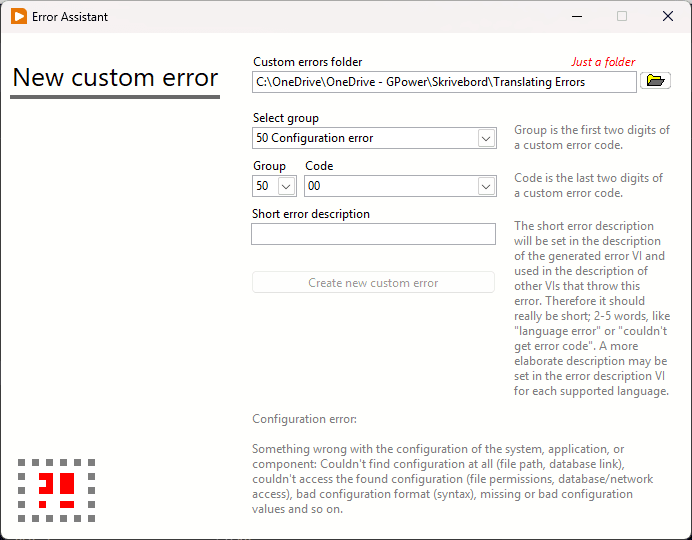
The assistant is designed to ensure consistent solutions across internal APIs and customer projects. It automatically selects the next sequential number in the series of error codes within the chosen category and ensures that the error code is stored in the correct location. In addition, the assistant helps you see which errors belong to the selected category. When creating an error code, you simply choose the category you want to use and give the error code a name.
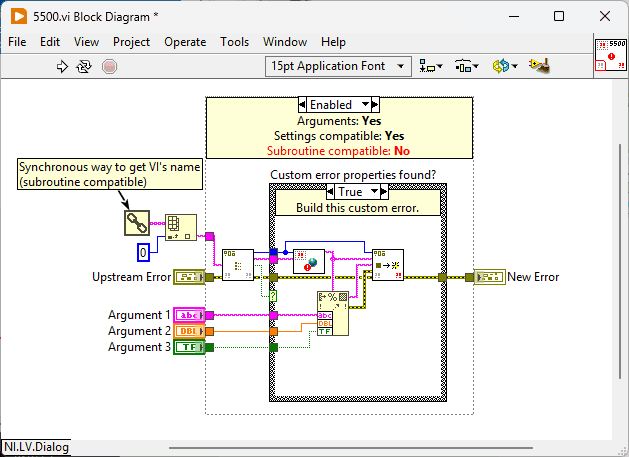
The result of creating error code 5500 can be seen in Figure 4 below. Note in particular that the number of the individual error translation is also displayed in the icon of this VI. If the error code requires specific parameters for troubleshooting, it is easier to modify the arguments that have already been created, or simply delete them if they are not needed. I should also briefly mention that the template includes built-in support for translating error messages into different languages.
If we look at an example from our Application v2 package, which includes the “Get VI Name” function, it is easy to see how the error code is implemented, as shown in Figure 5.
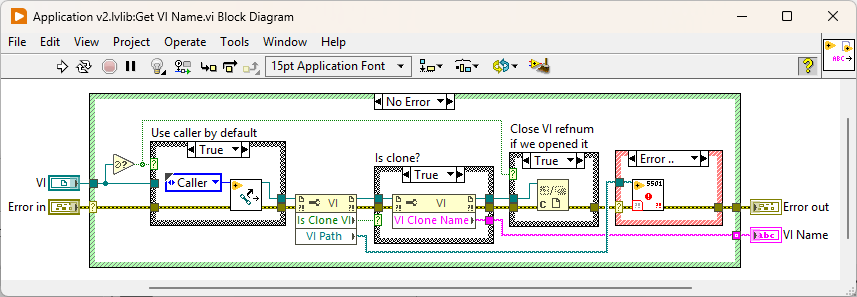
Any errors that occur within the function are translated into error 5501 – “VI Property Error”, with a parameter specifying the VI’s location on disk. In other words, no other error codes can be returned by this function.
A final comment
With this article, you should now be well equipped to create your own translations from internal errors to specific error codes. I am well aware that you do not have access to either our GPower Custom Error Assistant or the Application API, but these should be seen as examples of how it CAN be done. Not all of our rules will necessarily be right for you, so choose the ones that work and make use of them. The most important thing is to be consistent in your approach.
Before wrapping up, I would like to address one question you may still have. You might be wondering why there is only room for 100 error codes in each category. But if you need 100 unique error codes without any reuse within your API, there are probably other issues you should address, such as the modularization of your code.
Feel free to use the comments on LinkedIn if you have any feedback or questions about the article.

You should ONLY translate errors in functions exposed through the API interface.
– LabVIEW Champion, Jesper Kjær Sørensen, GPower

![Don’t let your error codes become the next Blue Screen of Death [3:4]](https://gpower.io/wp-content/uploads/2026/09/Figur-1-Windows-11-Blue-Screen-of-Death-1-300x225.webp)


![Error handling in LabVIEW [2:4]](https://gpower.io/wp-content/uploads/2026/06/Fejlhaantering-i-labview-jesper-kjaer-soerensen-gpower-300x169.png)