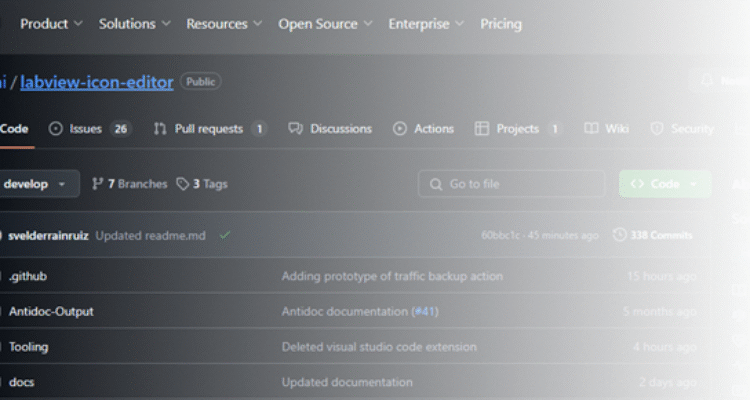
Following its acquisition by Emerson, NI (National Instruments) has set a new strategy to open up parts of LabVIEW and develop it as open-source software. This was presented in their keynote at NI Connect 2024 by Elijah Kerry and Jim Kring. In short, this means that we in the community have the opportunity to improve LabVIEW. The first project of this kind is the Icon Editor and its source code, which has been published on GitHub. If you would like to learn more about the process and the project’s status, read on here.
The Icon Editor
The choice fell on the Icon Editor project because it is already modular and has been for many years. The path to success was therefore shorter than if you had to start from scratch. The Icon Editor software is written in LabVIEW. This means that every time you create icons, you start a small LabVIEW program inside LabVIEW. The Icon Editor has existed since the beginning, so the code is old. It was rewritten for LabVIEW 2009 due to the introduction of object-oriented code, which there is a good article about on the LabVIEW Wiki covering the general use of the Icon Editor as well as the various tools.
The Icon Editor project as open source
The project itself as open source is a pioneering effort, where NI learns and adapts the processes needed to accept source code from the community. This covers how the code is developed, how the project is managed, and how NI R&D can integrate the resulting product into the next LabVIEW version. In addition, it includes how NI ensures usage rights to the code produced as part of the project. This also means that NI’s future open-source projects depend on the Icon Editor project being a success, so that they can be opened up for improvements.
The Icon Editor steering committee is led by Sergio Velderrain from NI together with many others from the community and me. The committee’s purpose is to discuss and revise the processes for how the project receives external code, as well as to process external improvements to the Icon Editor. This has also meant that the process has been rewritten quite a few times since the group started. The development process for the project is Git Flow, with a stable main branch and a more changeable development branch. The advantage of aligning with this process is that if you already know Git Flow, it is easy to get started. All new additions to the project start as a “Discussion”, which can become an “Issue”, which can then be implemented and included in a later version of LabVIEW.
What has happened so far?
The first thing the project has delivered is a LabVIEW-based “Continuous Integration (CI)” system to run all unit tests and create new builds of the software. Unit tests are essential in software development to ensure that existing features still work even when you change the code. In the LabVIEW environment, it is not common to use test-driven development (TDD), where you write the test before you write the code. You then develop the code until the test passes. In the Icon Editor project, LUnit is used to write unit tests. Unit tests are a good entry point for getting started with contributing to an open-source project.
Another lesson that quickly emerged in the project for the steering committee was that it was not immediately simple to swap out the Icon Editor so you could quickly test something. However, at the time of writing this has been resolved, and the solution makes it easier to test your code and your fixes from within LabVIEW. You can stay up to date on the project here.
In addition, we have made a major effort to bring the documentation up to a level where it is easy for a new developer to get started.
What do you gain as a developer?
Participating in or creating an open-source project is a great learning exercise for yourself in terms of good software development. In this project, NI sets the requirements for the development, so that part is essentially taken out of the equation. There is a need to develop new features or fix bugs, but there is also a need for documentation and tests that cover the implemented features and bugs.
Another valuable lesson is that you should limit your changes to only the specific feature you are working on, thereby reducing the scope of the change. It can be tempting to fix multiple problems on the same branch, but it can have consequences if, for example, you need to roll back that branch. In that case, you go from removing a single solution to the given problem to also removing the two other solutions to problems that were implemented on the same branch.
In addition, you become familiar with how LabVIEW is built in a modular way, how to use the new LabVIEW Add-on features, and much more. Overall, I would say that you become a better developer by working with open-source projects. If LabVIEW’s Icon Editor is not your cup of tea, there are plenty of other projects you can take on. It does not cost anything, and you are welcome to use LabVIEW Community Edition for the purpose, as long as it is a free open-source project.
See you in there 😉
/Jesper Kjær Sørensen, Systems Engineer – GPower
![Don’t let your error codes become the next Blue Screen of Death [3:4]](https://gpower.io/wp-content/uploads/2026/09/Figur-1-Windows-11-Blue-Screen-of-Death-1-300x225.webp)

![Error handling in LabVIEW [2:4]](https://gpower.io/wp-content/uploads/2026/06/Fejlhaantering-i-labview-jesper-kjaer-soerensen-gpower-300x169.png)

![Don’t let your error codes become the next Blue Screen of Death [3:4]](https://gpower.io/wp-content/uploads/2026/09/Figur-1-Windows-11-Blue-Screen-of-Death-1.webp)