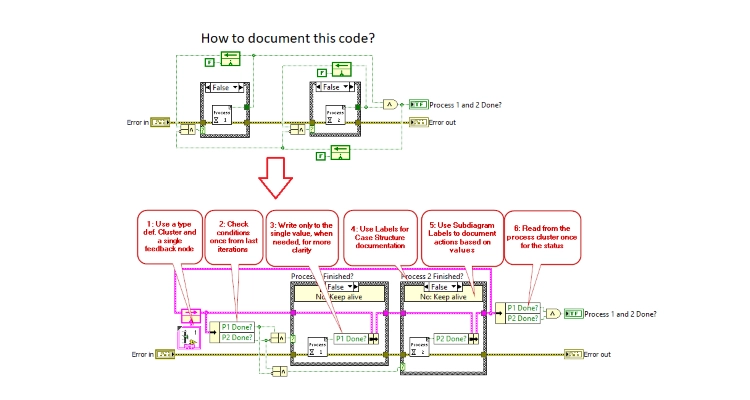
Use a typedef cluster and a single feedback node; check the conditions once per iteration based on the previous iteration, and write only to the specific value when necessary, to improve clarity. Find more tips on documentation in LabVIEW in the blog post.
Everyone has undoubtedly encountered undocumented code at some point, like the example shown at the top of the image, and asked themselves questions such as:
- Why was this code written?
- What are the conditions for execution?
- Why do the conditions for the case structures depend on the VI’s output?
- Why is this output inverted?
However, the above questions could have been avoided with a small effort to document the code using the built-in tools in LabVIEW.
In the lower part of the image, I have outlined a few points on how to document a VI using the simplest tool in LabVIEW. I have used the Cluster data type together with a feedback node to handle the data in each iteration, as these provide good documentation of the available data. And by adding labels and subdiagram labels for the case structures, understanding of the execution process becomes much clearer.
An important point to mention is also that these tools are available in all versions of LabVIEW.
Start documenting your code today!
My intention in writing this blog post was to highlight the importance of documentation in order to reduce complexity for the reader and to reduce errors in the code in the future.

![Don’t let your error codes become the next Blue Screen of Death [3:4]](https://gpower.io/wp-content/uploads/2026/09/Figur-1-Windows-11-Blue-Screen-of-Death-1-300x225.webp)


![Error handling in LabVIEW [2:4]](https://gpower.io/wp-content/uploads/2026/06/Fejlhaantering-i-labview-jesper-kjaer-soerensen-gpower-300x169.png)


![Don’t let your error codes become the next Blue Screen of Death [3:4]](https://gpower.io/wp-content/uploads/2026/09/Figur-1-Windows-11-Blue-Screen-of-Death-1.webp)